For your venue
A menu that supports your service.
From starters to daily specials: present your offering clearly and manage changes as service evolves.
One menu system. Your venue’s own rhythm.
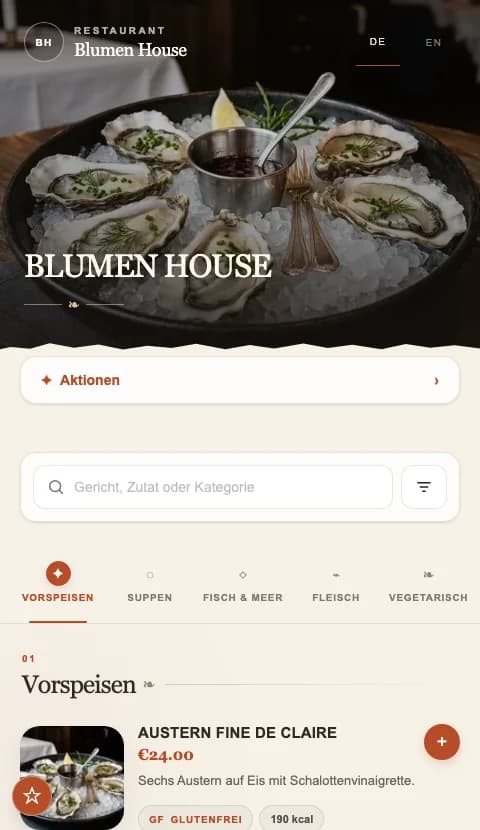
BUILT AROUND YOUR DAY
Clear courses and product options
Align updates with service
Browser access without guest registration
Build around your offering
Organise food and drinks into categories guests understand. Descriptions explain preparation and ingredients, while product options clarify variants and surcharges. Use photos to showcase selected dishes.
Keep the kitchen and menu aligned
When the daily special sells out, change its availability or visibility. When costs change, adjust prices and options in the dashboard. The QR link on your tables stays the same.
Welcome international guests
Offer the languages your guests need. Start includes one, Professional up to three and Premium up to six menu languages. Translations need to be maintained and checked; translation services can be agreed separately.
A TYPICAL SERVICE MOMENT
The daily special changes
The pasta special sells out at lunch. Your team updates its status while keeping the product details and image for next time.
- 01
Structure the menu
Collect products, options and current prices.
- 02
Review the content
Check languages, images and allergen details.
- 03
Use it during service
Test the printed code and assign responsibility for updates.
THE RIGHT TOOLS
Your menu speaks to your guests.
Up to six menu languages, depending on your package.↗Sold out? Keep your menu in step.
Change availability without recreating products.↗A FEW USEFUL ANSWERS
Good to know.
Do guests need an app?
No. The menu opens in a phone browser without guest registration.
Can I use it to take orders and payments?
BB QR Menu presents your digital menu. Ordering and payment features are not part of the offering described here.
YOUR VENUE. YOUR NEXT STEP.
A menu that fits the way you work.
Let’s talk about your menu, your guests’ languages and the features you need.