For your venue
Your drinks. Clearly presented.
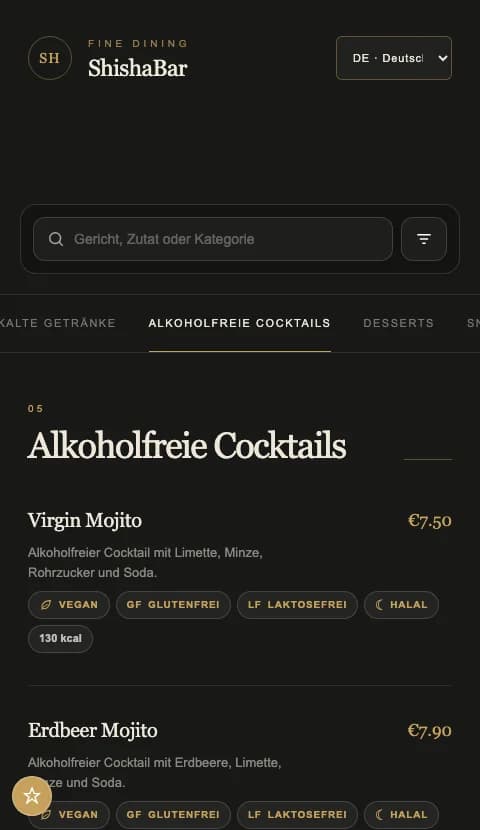
Cocktails, alcohol-free alternatives and seasonal specials in one menu, built for a drinks selection that evolves.
One menu system. Your venue’s own rhythm.
BUILT AROUND YOUR DAY
Explain signature drinks clearly
Highlight specials with scheduled campaigns
Maintain drinks and options centrally
Help guests explore your drinks
Use recognisable drink groups and short descriptions for signature drinks. Product options can represent sizes and surcharges. Give alcohol-free alternatives an easy-to-find place.
A place for seasonal specials
Professional and Premium include scheduled campaigns with images and copy. Use them to highlight a new drink or a limited-time offer. A campaign notice does not change product prices automatically.
Test it where guests use it
Test the guest menu and printed QR code under your usual lighting. Concise descriptions, clear categories and maintained availability support browsing. The menu opens in a browser without a guest account.
A TYPICAL SERVICE MOMENT
A seasonal aperitif
A scheduled campaign introduces the new aperitif. Maintain the actual price and available options on the product.
- 01
Organise the drinks
Create categories and concise product descriptions.
- 02
Prepare the special
Align campaign copy with the product price.
- 03
Test at the table
Check readability and scanning under evening lighting.
THE RIGHT TOOLS
Give your special its moment.
Present promotions in your menu and schedule their display.↗New prices. Same QR code.
Maintain prices and surcharges without reprinting your menu.↗A FEW USEFUL ANSWERS
Good to know.
Do guests need an app?
No. The menu opens in a phone browser without guest registration.
Can I use it to take orders and payments?
BB QR Menu presents your digital menu. Ordering and payment features are not part of the offering described here.
YOUR VENUE. YOUR NEXT STEP.
A menu that fits the way you work.
Let’s talk about your menu, your guests’ languages and the features you need.